

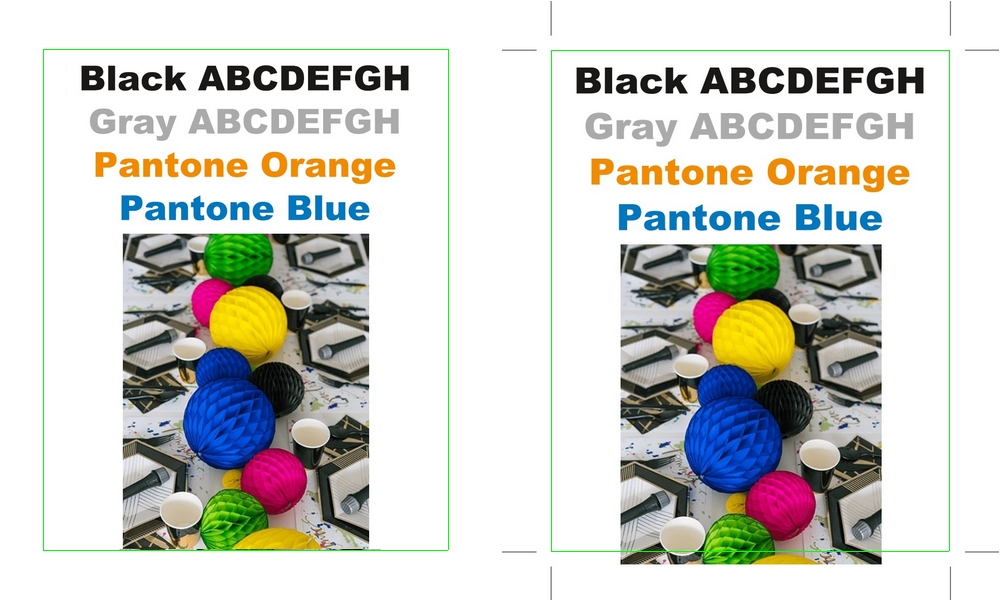
What Does “Adding Bleed and Crop Marks” Mean?
In professional printing, a PDF should include the information needed for accurate trimming. Bleed is the extra area beyond the final cut size, and crop marks show where to trim.
If your PDF is missing these elements, printing can result in white edges, inaccurate cutting, or file rejection by the print shop. We add the required technical elements directly to your PDF to make it print-ready.
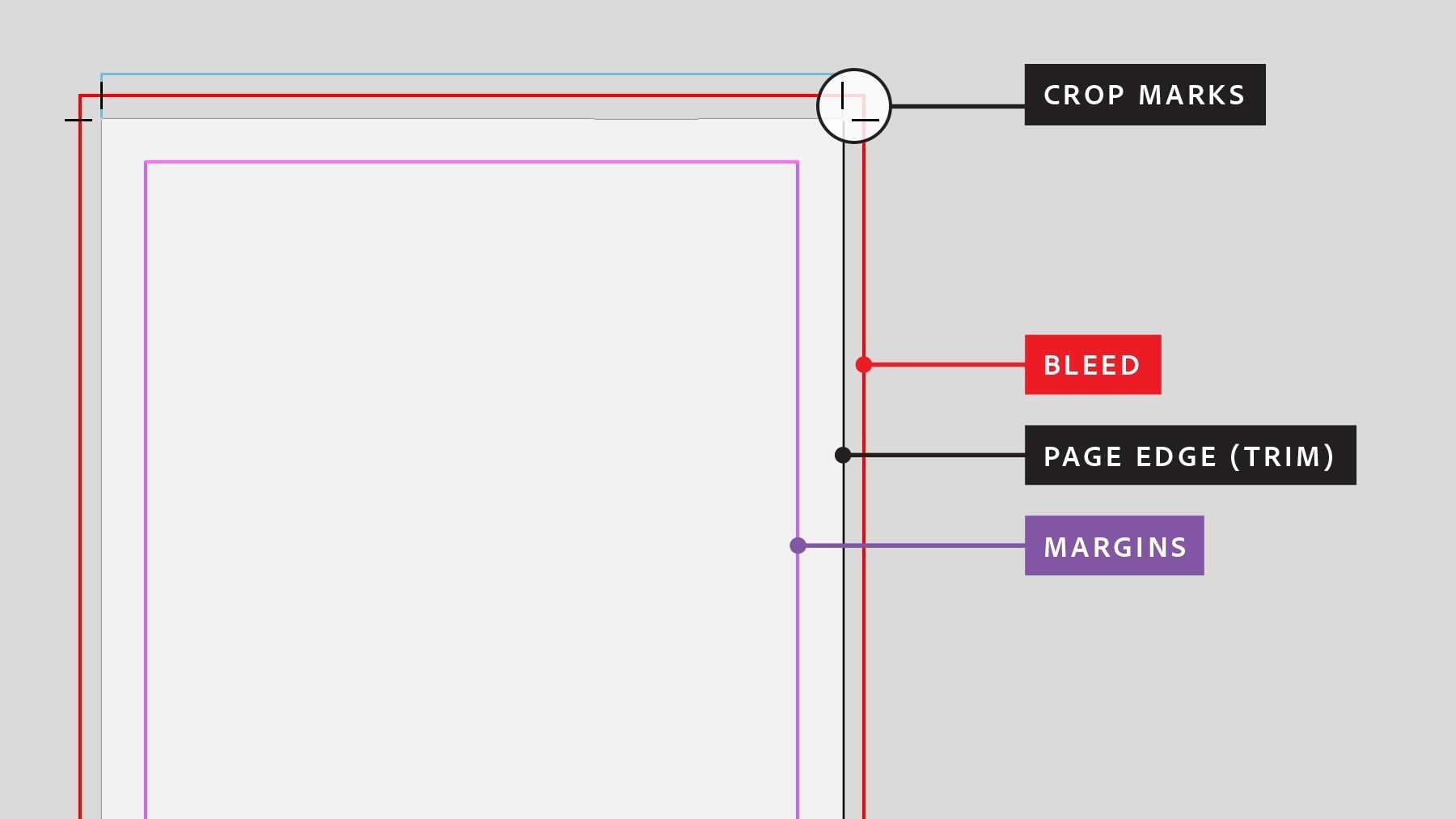
Quick definitions
- Bleed: extra edge area to avoid white borders after cutting
- Crop marks: cutting guides for the final trim size
- Safe area: keep text/logos away from the trim line
When Is This Service Needed?
This service is useful when you need to fix a PDF quickly and professionally — especially if redesigning is not an option.
- Your PDF has no bleed and the print shop requires it
- Crop marks are missing or incorrect
- You no longer have the original design file
- The printer requests changes after export
- You want to avoid delays and reprints
What We Do to Your PDF
We apply a professional post-processing workflow to make your file safe for production.
Bleed Creation (Where Possible)
We create a bleed zone and extend backgrounds safely when artwork allows it.
Add Accurate Crop Marks
We insert precise crop marks to define the final trim size clearly for production.
Safe Area Check
We verify that important elements are not too close to the trim line.
Print Compatibility
We keep the updated PDF compatible with professional printing and RIP systems.
Important Note About Bleed Creation
Adding bleed after export is possible only within certain limits. If background elements already reach the edge, bleed can usually be extended safely.
If essential content ends exactly at the trim line, true bleed may be limited. In such cases we recommend the safest option — focused on print reliability rather than risky quick fixes.
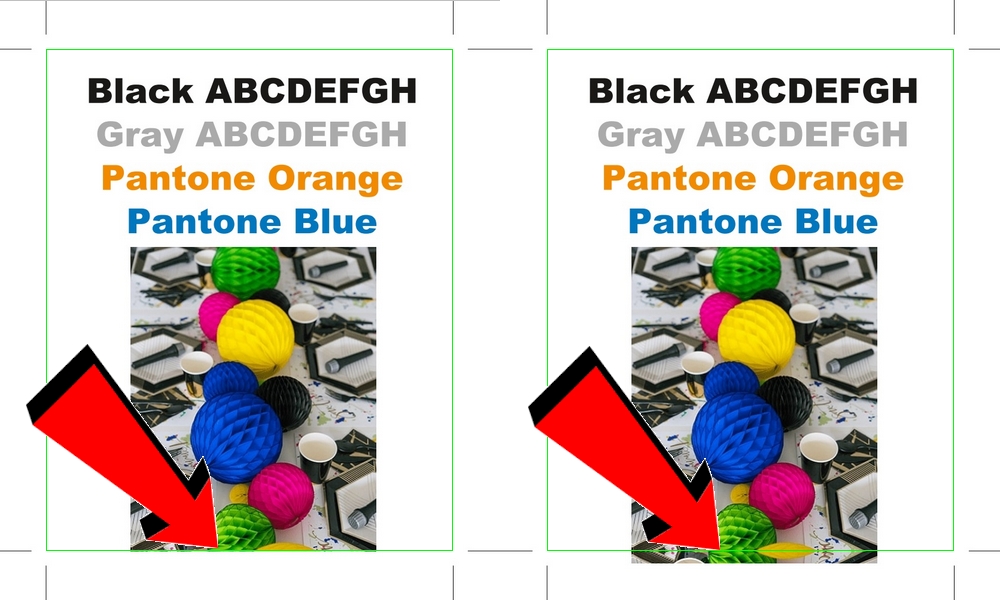
Typical Bleed Size and Creation Methods
The standard bleed size we use is 3 mm, which meets the requirements of most professional print shops.
Bleed by Enlargement
If background elements already reach the edge of the page, we can extend them by slightly enlarging the artwork to create a safe 3 mm bleed area.
Bleed by Mirroring
If enlargement is not suitable, bleed can be created by mirroring edge pixels beyond the trim line. This method preserves visual continuity while maintaining print safety.
The chosen method depends on the layout, background type, and proximity of important content to the trim line. Our priority is always print reliability and visual consistency.
Who Is This Service For?
- Non-technical print buyers
- Graphic designers
- Marketing agencies
- Print shops receiving incomplete PDFs
- Anyone needing fast, professional correction
For Print Shops and Production Teams (B2B)
We support print professionals who need consistent file preparation and fewer production interruptions. This service works as an external QC step or as overflow support during peak periods.
Production-focused benefits
- Cleaner intake: fewer back-and-forth revisions
- Less manual intervention in prepress
- Reduced risk of trimming mistakes
- More predictable output on press
Reliable files. Stable workflows. Fewer surprises on press.
FAQ
What are bleed and crop marks in printing?
Bleed is the extra area beyond the final trim size, ensuring no white edges after cutting. Crop marks show where the printed sheet should be trimmed to the final size.
Can you add bleed to a PDF after export?
Yes, in many cases. If backgrounds reach the edge, bleed can often be extended safely. If essential elements stop at the trim line, options may be limited and we will recommend the safest solution.
Do I need the original design file to add crop marks?
Not always. Crop marks and related print marks can be added directly to a PDF. Adding true bleed depends on the artwork and how the file was designed.
Is mirrored bleed acceptable for professional printing?
Yes, mirrored bleed is commonly accepted in professional printing when true bleed extension is not possible. It works best with continuous backgrounds or textures and should not include important visual elements or text near the trim line. When applied correctly, mirrored bleed provides safe trimming and reliable print results.
Make Your PDF Print-Ready – Without Redesign
Upload your PDF and we will add crop marks and, where possible, create bleed for safe trimming and professional results.
No redesign. No guesswork. Just a print-ready PDF prepared for production.