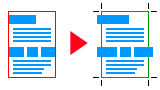
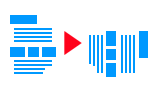
Add bleed and crop marks to PDF online.

Work on your PDF like in a desktop editor: the file stays visible the whole time, and you can check the result of every step before you download.

Upload your PDF Try with a sample PDF

Try every tool on your own file – a subscription is only needed to download. Files are deleted after 60 minutes.

Used by print shops and copy shops in the UK, the Netherlands, Belgium, Germany, the US and Canada, as well as by private customers.

Add bleed and crop marks to PDF simply.

Preparing bleed, crop marks and crop size
PDF size will be the cut size.

Add crop marks and trim size to PDF simply.

Preparing bleed, crop marks and crop size
PDF cut size can be adjusted arbitrarily.

PDF resize, by size or percentage.

Increasing or decreasing the size of PDF
Resizing according to the size or trim size of the PDF.

PDF cropper.

Cropping, trimming document
PDF cutting around by size or manual setting.

Four-color black conversion to 100% black.

Converting CMYK fonts to 100% black
CMYK black font or graphics in PDF. Make a 100% black font and graphics simply.

Registration Color Error Correction.

PDF registration color conversion.
Check registration colors (graphics elements and letters) and convert.

Jpg, tiff, png images to PDF with bleed and crop marks.

Create PDF from jpg, tiff, png images.
Transformation of images to PDF format. Add a bleed and crop marks.

Image data in PDF.

Image data in PDF.
Color space, resolution, dimensions. Save pictures from PDF.

Modify PDF Background Size.

Increase or change the background of a PDF.
In all directions, the margin can be easily increased.

Moving PDF content inside the page.

Moving page content to another position.
Moving the contents of the page to another location.

Rotate PDF page.

Rotate PDF page to the right or left.
Rotate PDF content per side.

Summary of pages by colors.

Color or black site.
Color, black or white page. Average paint load on pages.

Reducing size of the PDF.

Compress Pdf.
Reducing the size of images above 400 dpi.

Deleting pages.

Deleting page
Deleting one or more pages from PDF.

Saving pages.

Saving page
Save one or more pages from PDF.

Adding pages to the PDF.

Adding page
Add one or more pages to PDF.

Add a blank page to the PDF.

Add a blank page to the PDF.
You can easily add a blank page to the PDF.

PDF color conversions.

PDF RGB CMYK conversion.

CMYK RGB color space conversion
PDF color space change. Convert RGB color to CMYK color in PDF file.

Convert PDF to gray.

Converting color PDF to gray tone black
PDF color space change. Convert color to black and white.

Pantone color converter.

Converting Pantone to CMYK
Convert Pantone or Direct Color to CMYK.

Deleting ICC color profile.

Deleting ICC color profile
ICC profiles in PDF.

Merge the layers.

Combining the layers
Merging layers in pdf.

PDF checklist.

Checking the CMYK black fonts and graphics in PDF.

CMYK 4-colour black font
Black consists of 100% black or CMYK values.

Checking the color space.

Checking the RGB CMYK color space
Shows PDF color spaces. CMYK, RGB, GRAY, pantone or other separated color.

PDF separated color, Pantone colors.

List of Pantone, separated colors
List of separated colors in the PDF. Pantone or other spot color.

Verification of image resolution.

Checking the quality of photo. DPI resolution.
Provides information about the quality of your PDF photos.

ICC color profile of PDF.

Embedded ICC color profile
List and data of embedded ICC color profiles.

Checking trim size and bleed.

Bleed, crop size, crop marks
All sizes in mm and inch.

PDF embedded fonts.

Embedded fonts
Shows a list of non -embedded fonts.

Checking layers.

Layers
PDF has one or more layers?

Pdf maximum pigment.

CMYK Maximum pigment
CMYK maximum pigment.

PDF/x standard.

PDF/x printing standard
Check PDF/X standard.

Prepress PDF check.

how to make a PDF print ready
PDF checklist for printing
How does it work?

Just like an individual program on your computer. After uploading the file, many operations can be performed. You can check the results of the operations, you can open PDF without downloading. It is enough to save it on your own computer after completing the work.

What do I get?

A PDF checking list, which can be printed or saved in PDF. For resolving problems with 17 individual modules. The end result is a professional printable PDF with cmyk color space, crop size and crop marks.

Safety of your data.

The location of processing is an individual server working in a European cloud, operated according to the European GDPR regulations. Your data will be deleted after 60 minutes. No saving or copy is made about the uploaded files.

Why the PressPDF?

Because it provides simple and quick solution for daily problems in case of printable PDF. All operations can be used with a single uploading. The result can be checked continuously.

For whom is it prepared?

For all people who wish to prepare printable PDF, including printing company personnel or enthusiastic amateurs, who plan to take own materials to printing company.

Why is it unique?

Because it offer professional solution for almost any problem, which might occur in relation to PDF taken to a printing company.

Frequently asked questions

What is PressPDF?

PressPDF is an online prepress tool for making PDF files print-ready. It adds bleed and crop marks, resizes and crops PDFs, converts colors (RGB to CMYK, Pantone to CMYK, 100% black) and checks fonts, image resolution, color spaces and trim size. Your PDF stays visible the whole time, like in a desktop editor.

How do I add bleed to a PDF?

Upload your PDF, then choose a 3 mm bleed (or 2 mm if there is little space at the edges) and the bleed type, for example mirrored bleed. The live preview shows the result with crop marks before you download the file.

Is PressPDF free?

You can try every tool on your own file without a subscription and check the result in the live preview. Downloading the finished PDF requires a subscription: €9 for 1 month, €24 for 3 months or €90 for 1 year.

Which files can I upload?

PDF, JPG, TIFF and PNG files. The maximum file size is 100 MB without a subscription and 1 GB with a subscription.

Are my files safe?

Files are processed on a dedicated server in a European cloud, in line with the GDPR. Uploaded files are deleted after 60 minutes, and no copies are kept.

Who is behind PressPDF?

PressPDF is developed and operated by Micropress Kft., a Hungarian printing company with more than 35 years of experience in print production. The service has been running for five years and is available in 16 languages.

How is PressPDF different from simple online bleed tools?

PressPDF was built by a printing company for everyday prepress work, not as a single-purpose converter. You see the PDF throughout the process, every step can be checked before download, and it also offers color conversions and prepress checks that are not available in other online tools.

Who uses PressPDF?

PressPDF is used by print shops and copy shops in the UK, the Netherlands, Belgium, Germany, the US and Canada, as well as by designers and private customers who want to prepare their own files for printing.

Cookies. By using this website, you automatically accept that we use cookies. Privacy Policy.